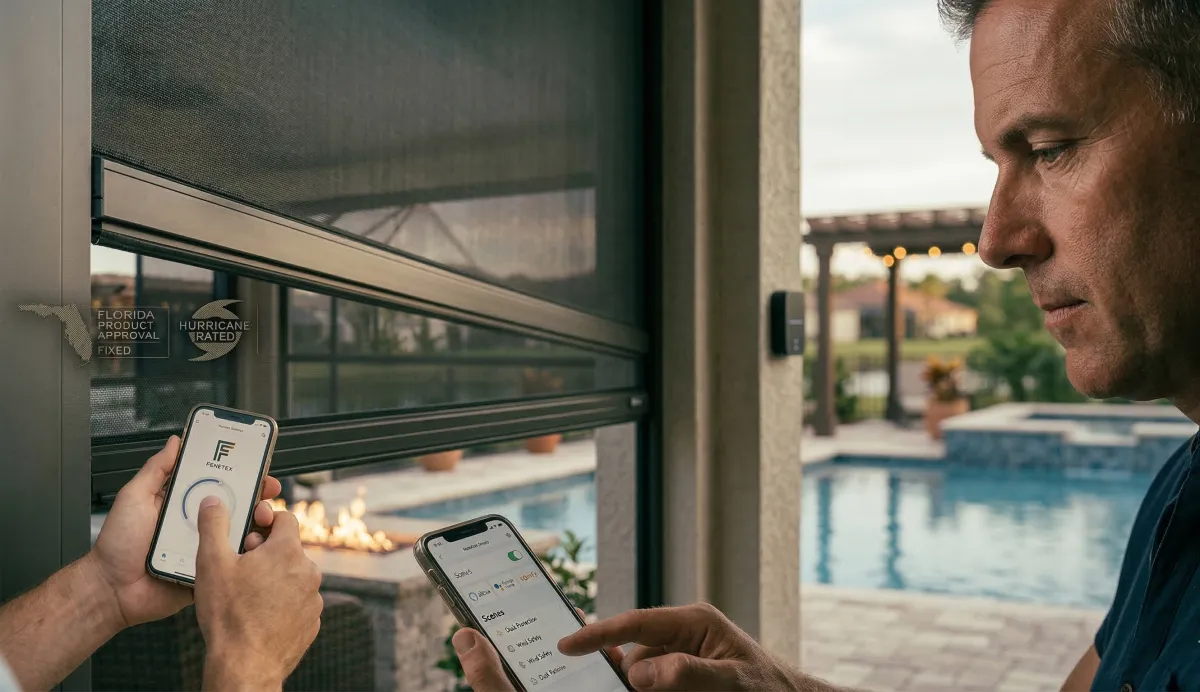
Smart Home, Smart Outdoors: Automating Your Motorized Screens with Alexa, Google, and Somfy
Your indoor life is already automated. Alexa dims the lights. Google adjusts the thermostat. Your phone locks the front door when you leave. The devices you touch most run on routines and voice commands that would have seemed absurd ten years ago and now feel like the bare minimum for a modern home.
Your outdoor space should work the same way.
Fenetex motorized screens are not just motorized they are connected. Through the Bond Bridge Pro system, every Fenetex screen Titan installs in St. Augustine, Nocatee, Ponte Vedra Beach, and across Northeast Florida integrates directly with the smart home platforms you already use: Amazon Alexa, Google Home, and Somfy. That means voice control, smartphone control, automated schedules, scene-based deployment, and remote operation from anywhere not just the wall switch by the sliding glass door.
This post is the complete guide to what smart home integration means for your motorized screens, how it works, and why the automation capabilities are not a luxury feature they are the element that makes the screens genuinely effortless to use every day.
Why Smart Home Integration Matters for Outdoor Screens
Here is the honest reality of any motorized product that relies solely on a wall switch or a handheld remote: it gets used less than it should.
Not because the homeowner does not want to use it. Because the moment passes. You are in the kitchen making dinner and the mosquitoes have arrived on the lanai, but the wall switch is across the room and the remote is in the drawer and by the time you walk over to deploy the screens, you have already decided to eat inside. Or the thunderstorm hits at 3:00 PM and you are at the office, and the outdoor furniture is getting soaked because no one is home to press the button. Or you are hosting a party and the sun shifts to the west side of the lanai, but you are in the middle of a conversation and the remote is on the kitchen counter.
Smart home integration eliminates those moments. It turns screen deployment from a conscious action into something that happens either automatically, by voice, or with a single tap on the phone you are already holding.
The behavioral data from motorized screen manufacturers is consistent: homeowners with smart home integration deploy their screens 40 to 60 percent more frequently than homeowners using a wall switch or remote alone. More frequent deployment means more insect protection, more UV blocking, more furniture preservation, more rain management, and more time spent using the outdoor space the screens were installed to protect.
The screens are the hardware. The smart home integration is what makes the hardware habitual.
How It Works: The Bond Bridge Pro Connection
The technical architecture is straightforward, and understanding it helps explain why the system is as reliable as it is.
Fenetex motorized screens use Somfy smart motors the global standard for motorized exterior shading and screening products. Somfy motors communicate via radio frequency (RF) signals, the same technology used by garage door openers and wireless remotes. The motors are quiet, powerful, and designed for daily cycling in outdoor environments.
The Bond Bridge Pro is a small device roughly the size of a smartphone that connects to your home's Wi-Fi network and acts as a translator between the Somfy RF motors and your smart home platforms. It receives commands from Alexa, Google Home, the Bond Home app, or any connected automation system, and transmits them as RF signals to the Fenetex screen motors. The screens deploy or retract in response.
The Bond Bridge Pro supports up to 50 devices in a single home more than enough for a full complement of motorized screens, pergola louvers, ceiling fans, and any other RF-controlled products. It communicates with Alexa, Google Home, Google Assistant, Apple HomeKit (through Homebridge), Samsung SmartThings, and professional-grade systems including Control4, Savant, Crestron, and URC.
Titan installs and configures the Bond Bridge Pro as part of every motorized screen installation that includes smart home integration. We do not hand you a device and a manual. We set it up, connect it to your platform, program your screens, and confirm that every control method voice, app, remote, and wall switch is working before we leave your property.
Voice Control: The Commands That Change Daily Habits
Voice control is the feature that converts motorized screens from a product you operate into a product you barely think about because the command takes less effort than the thought.
Amazon Alexa:
"Alexa, lower the lanai screens." "Alexa, raise the west screen." "Alexa, set the patio screens to 50 percent." (partial deployment for shade without full enclosure)
Alexa commands work from any Echo device in the home the kitchen counter, the bedroom, the living room, or a weatherproofed Echo on the lanai itself. There is no range limitation beyond the Wi-Fi network's coverage. If you can talk to Alexa, you can control the screens.
Google Home / Google Assistant:
"Hey Google, close the lanai screens." "Hey Google, open the pergola screens." "Hey Google, lower the pool area screens."
Google commands work from any Nest speaker, Google Home device, or Android phone. The integration supports individual screen control and group control deploy all screens simultaneously or address each opening independently.
For homeowners in Nocatee, Ponte Vedra Beach, and the communities across St. Johns County where both Alexa and Google ecosystems are common, Fenetex screens work with both simultaneously and without conflict. You do not need to choose one platform over the other.
App Control: Your Lanai in Your Pocket
The Bond Home app available for iOS and Android provides direct smartphone control of every Fenetex screen in the home. The app displays each screen individually, shows its current state (deployed, retracted, or at a specific position), and allows one-tap control from anywhere with a cellular or Wi-Fi connection.
The anywhere part matters.
If you are at work and a thunderstorm is approaching St. Johns County, you can deploy the lanai screens from your desk protecting the outdoor furniture, the kitchen appliances, and the sliding glass doors before the rain arrives. If you are traveling and a tropical storm watch is issued for Flagler County, you can deploy your hurricane-rated MaxForce screens remotely securing the lanai before you have even called your neighbor to check on the house.
For homeowners with second homes in the Northeast Florida market a segment that represents a meaningful share of the Ponte Vedra Beach and St. Augustine Beach corridor remote app control transforms the screen system from a product that requires physical presence to a product that works regardless of whether anyone is home.
Automation Routines: Screens That Deploy Themselves
This is where smart home integration transitions from convenient to transformative.
An automation routine is a programmed instruction that tells the screen system what to do, when to do it, without any human input. The Bond Home app, Alexa Routines, and Google Home Routines all support time-based and condition-based automation for Fenetex screens.
Time-based routines (the most useful for daily comfort):
The mosquitoes and no-see-ums in Northeast Florida follow a predictable daily cycle — low activity during midday, escalating in the late afternoon, peaking at dusk. The afternoon sun on a west-facing lanai follows an equally predictable pattern — direct exposure from approximately 1:00 PM through sunset during summer months.
A homeowner can program the following routine:
5:30 PM daily (May through October): All lanai screens deploy automatically. The space is sealed before the first mosquito arrives and before the worst of the afternoon sun on the west-facing side.
8:00 AM daily: All screens retract automatically. The lanai opens for the morning — fresh air, open views, no screens in the sightline.
Weekends custom schedule: Screens deploy at 4:00 PM instead of 5:30 to accommodate earlier entertaining.
This routine means the homeowner never thinks about the screens during insect season. The lanai is automatically sealed every evening and automatically open every morning. The habit of using the outdoor space is maintained without a single button press.
Scene-based routines (the most useful for entertaining and storm prep):
A "scene" is a single command that controls multiple devices simultaneously. Fenetex screens, StruXure pergola louvers, outdoor lighting, ceiling fans, and any other connected device can be grouped into a scene that executes with one voice command or one app tap.
"Alexa, movie night." → Lanai screens deploy. Pergola louvers close. Outdoor lighting dims to 20 percent. Ceiling fan sets to low.
"Hey Google, storm prep." → All hurricane screens deploy. Pergola louvers close fully. Interior notification confirms deployment.
"Alexa, good morning." → All screens retract. Pergola louvers open to 45 degrees. Outdoor lighting off.
These scenes take 30 seconds to create in the app and save minutes of manual adjustment every time they run. Over the course of a year, the cumulative time saved — and the increased frequency of outdoor space usage — is substantial.
Weather-responsive automation:
For homeowners who want the system to respond to real-time conditions without any input at all, wind and rain sensors can trigger automatic screen deployment. If wind speed exceeds a set threshold, screens retract to protect the fabric. If rain begins, screens deploy to protect the outdoor furniture and kitchen. These sensors integrate through the Somfy ecosystem and operate independently of the home's Wi-Fi meaning they function even during internet outages.
The Hurricane Preparation Advantage: Remote Deployment When It Matters Most
The smart home capability that carries the most serious real-world consequence is not the daily automation. It is the ability to deploy hurricane-rated screens remotely when a storm approaches.
Hurricane preparation in Northeast Florida often happens under time pressure. A storm changes direction. A tropical depression strengthens overnight. The 72-hour window that emergency management recommends compresses into 24 hours. For homeowners who are at work, traveling, or managing family logistics while a storm approaches St. Johns County, the ability to secure the lanai from a smartphone — without being physically present — is not a convenience. It is a meaningful safety advantage.
A homeowner with Fenetex MaxForce hurricane screens and Bond Bridge Pro integration can deploy every screen on the property from any location with cellular service. The deployment can be triggered from the app, from a voice command to Alexa or Google, or from a pre-built "storm prep" scene that deploys all hurricane screens and closes the pergola louvers simultaneously.
This does not replace the need for aluminum shutters on windows and doors — those require physical deployment in most configurations. But it secures the lanai, the outdoor kitchen, and any large opening covered by motorized screens while the homeowner is still en route to the property to handle the rest of the preparation.
Combined with the pre-season hurricane checklist and the complete shutter plan covered earlier in this series, smart home integration adds a layer of flexibility to storm preparation that manual-only systems cannot match.
What Titan Configures During Installation
Smart home integration is not an aftermarket addition to a Fenetex screen installation. It is a standard component of every Titan project that includes connected controls — and we configure it completely before we leave your property.
Here is what the setup includes:
Hardware installation. The Bond Bridge Pro is installed in a central location within RF range of all screen motors. For larger homes or properties where screen motors are spread across multiple outdoor spaces, additional Bridge units are positioned to ensure full coverage.
Platform connection. We connect the Bond Bridge Pro to your home Wi-Fi network and link it to your Alexa, Google Home, or Somfy platform — whichever you use. If you use multiple platforms, we connect all of them.
Screen programming. Every individual screen is programmed into the Bond Home app with a custom name that matches its location — "West Lanai Screen," "Pergola North," "Pool Area Screen" — so voice commands and app controls are intuitive and unambiguous.
Automation setup. We build the daily routines and scenes you want — the dusk deployment schedule, the morning retract schedule, the entertaining scene, the storm prep scene — and test each one to confirm it executes correctly.
Multi-control confirmation. We verify that every screen responds to every control method — voice command, app, handheld remote, and wall switch — before we leave. If one method fails, we troubleshoot on-site until it works.
Homeowner walkthrough. We demonstrate the system to you and every household member who will use it. We show you how to create new routines, modify existing ones, and troubleshoot basic issues. And we remain available by phone after installation if questions arise.
This is not a 15-minute orientation. It is a comprehensive setup that ensures the smart home integration works as well on Day 365 as it does on Day 1.
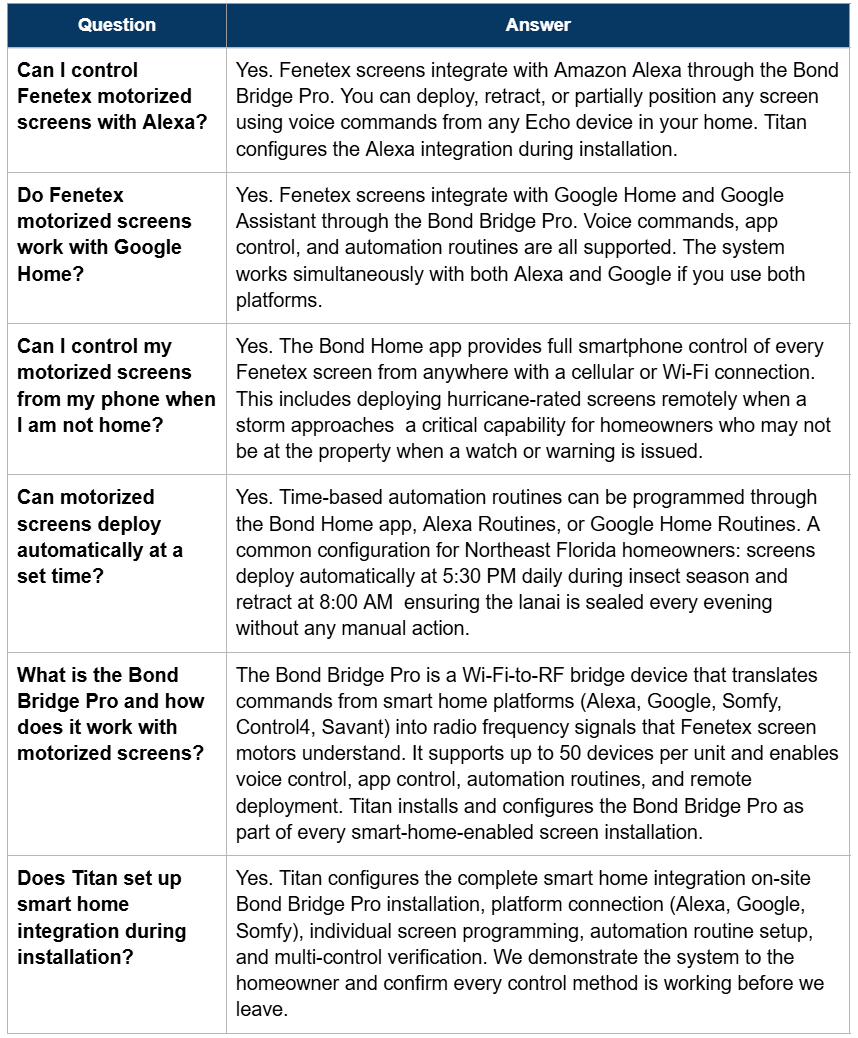
Frequently Asked Questions
Schedule Your Free Home Assessment
Serving St. Augustine · Nocatee · Ponte Vedra Beach · Palm Coast · Jacksonville · Northeast Florida
Your outdoor space should be as smart as the rest of your home. We design, install, and fully configure motorized screen systems with complete smart home integration — Alexa, Google, Somfy, and the Bond Bridge Pro — so your lanai deploys on command, on schedule, or on its own.
One visit. One quote. Full smart home setup included in every installation.
Call or text: (904) 484-7580 | TitanShuttersandScreens.com
Read the full series:
